Quick answer
Minions are companions obtained from enemies. The official description includes boss capture and combat support; the Take the Reins achievement identifies a Rein as an item used to unlock a minion.
The sources do not establish a universal capture chance, Rein recipe, or availability for every named enemy. Read the item and target information in your current game before spending a resource.
Before using a Rein
- Inspect the Rein’s description and any stated restrictions.
- Check which minion the action will unlock, where the game provides that information.
- Read the action or confirmation carefully before consuming the item.
- After unlocking, inspect the minion’s effect and available management options.
- Compare it against the needs of your present hero rather than rarity alone.
This is a careful-use checklist. It does not invent a button sequence for game states that our sources do not document.
Read the minion panel
The official store screenshot shows the selected Defiled Wyrm, a Legendary Dragon, in the minion panel. It gives you more to compare than rarity alone.
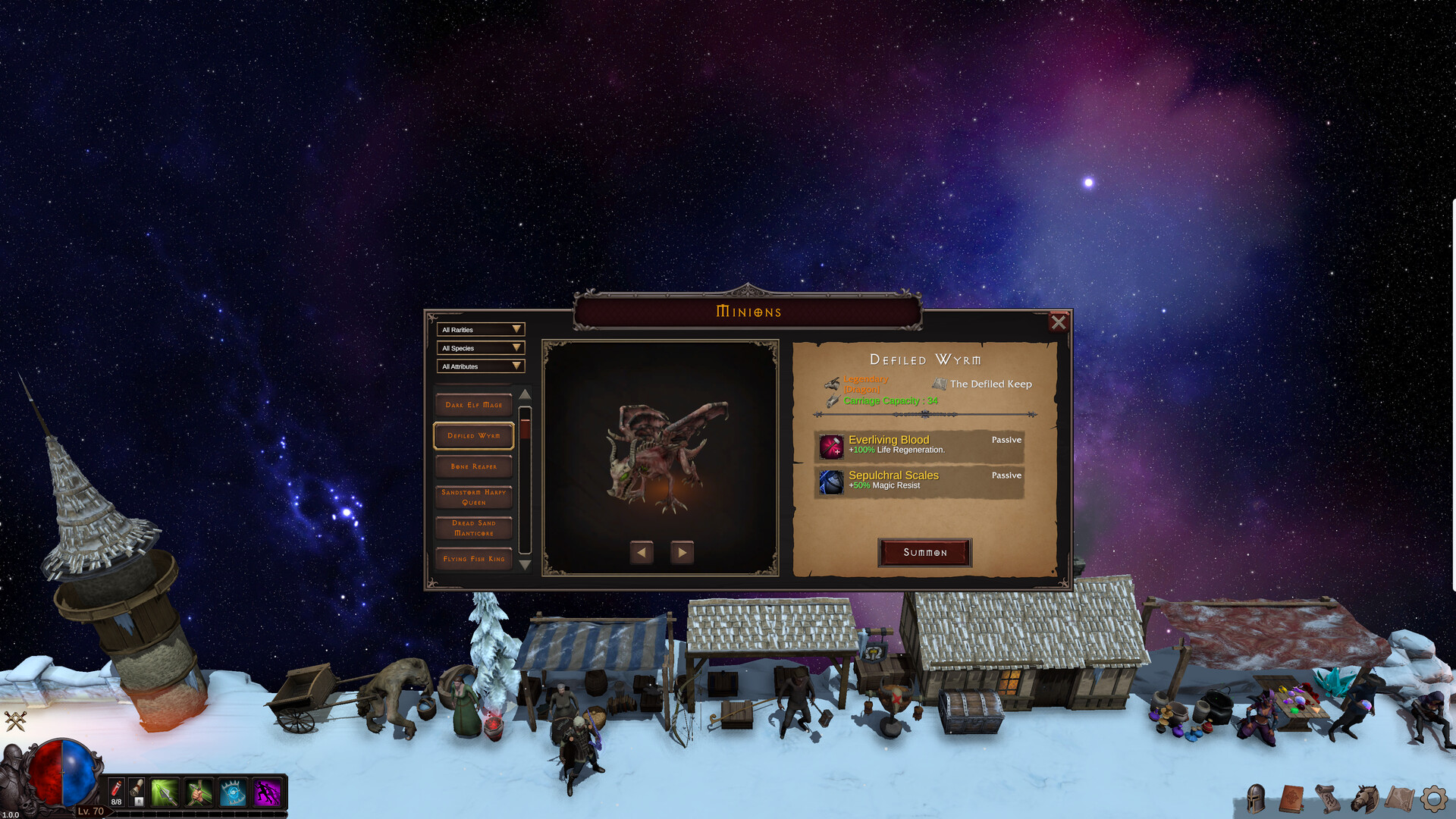
| Visible field | Screenshot example | How to use it |
|---|---|---|
| Rarity and species | Legendary · Dragon | Identify the companion before comparing effects |
| Location | The Defiled Keep | Note the listed location; this field does not promise a drop rate |
| Carriage Capacity | 34 | Include capacity in your comparison, alongside combat effects |
| Everliving Blood | Passive · +100% Life Regeneration | Check whether regeneration addresses your current survival problem |
| Sepulchral Scales | Passive · +50% Magic Resist | Consider whether magic damage is relevant to the encounter |
| Action | Summon | The panel provides a Summon control for the selected minion |
These values belong to the pictured companion. They are not universal minion stats or a promise that this is the best companion for your level.
Choose a role before choosing a companion
The official store describes both passive buffs and active companion abilities. In the screenshot, the left-hand list can be narrowed with All Rarities, All Species and All Attributes filters. Use the available filters to find a candidate, select it and inspect the details before summoning.
For a survival problem, compare the displayed defensive effects against the damage that is stopping you. For another goal, read the candidate’s actual effects rather than assuming a higher rarity solves it. Keep carriage capacity in view if you are comparing support utility as well as combat.
Once you have a candidate, use the panel’s Summon control and check the resulting state in your game. This screenshot documents the selection panel; it does not establish the whole Rein-unlock sequence or a companion-switching cooldown.
Why have I not found the Rein I want?
Our official sources do not provide a target-by-target Rein drop table, a guaranteed number of kills or a universal capture percentage. The visible location field is useful context, but it is not enough to promise a farming route or rate.
Check the exact Rein and minion names in your game. Treat an older demo video or a single player’s drop report as a lead to investigate, not a guaranteed result. Before investing a long farming session, look for the target, game version and sample size behind a claimed rate.
Check the result
Use a familiar encounter with your previous setup as a baseline. Change the companion alone and observe whether the result improves. For the pictured Wyrm, that means checking whether its defensive effects help your actual problem rather than expecting a direct damage upgrade.
Keep a note of what changed so that you can reassess it after a patch. If equipment is the next bottleneck, continue to the worked weapon comparison.
Sources & review
Reviewed Sep 30, 2026 Official facts are drawn from the sources below. Checklists and comparison methods are editorial recommendations; they are not claims of in-game testing.
- Official Steam store ↗Game systems, developer, supported platform and release date.
- Steam global achievements ↗Class names, equipment slots, named progression milestones and Rein terminology.
- Minion panel · official Steam screenshot ↗Visible companion effects, carriage capacity, location, filters and Summon control. Promotional example, not a full companion database.